
AltiForce-GPS1.1 - App Store
You'll be able to see results in few seconds.
Publisher Description
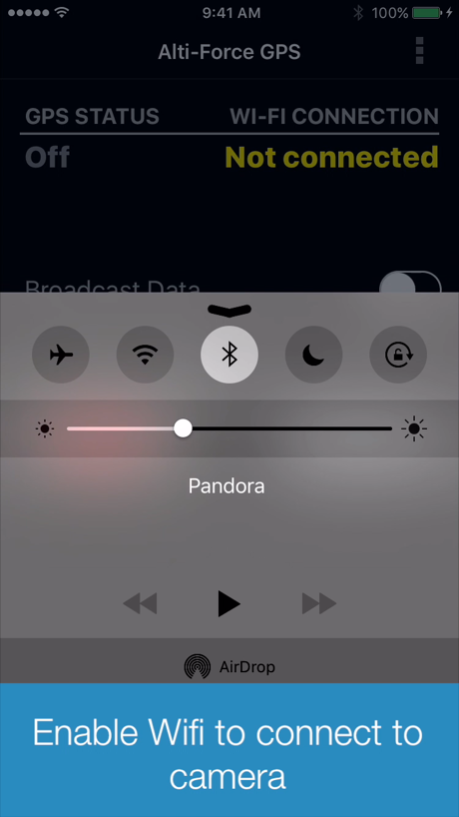
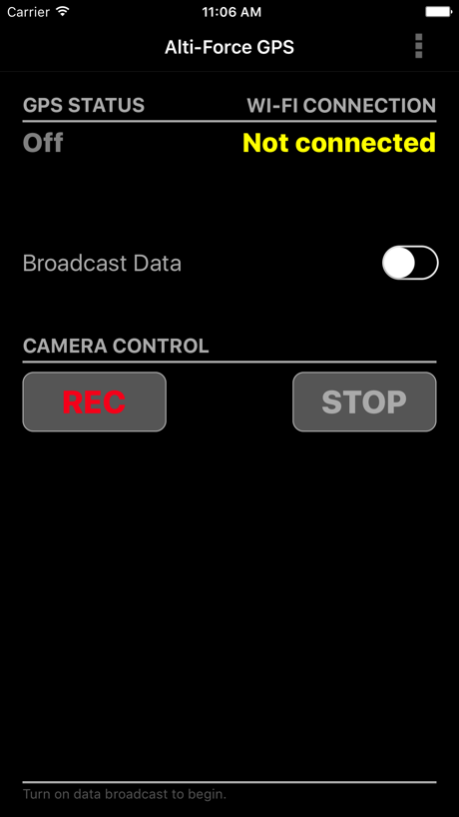
The Alti-Force GPS application works with the Alti-Force Sensor Pack and GoPro(R) Hero4 camera to add GPS-based speed, distance, and direction traveled to your action video recordings.
Alti-Force GPS uses a mobile device to receive a GPS signal and broadcast the data over Wi-Fi to a Hero4 camera equipped with the Alti-Force Sensor Pack. The additional GPS-based data can be displayed as subtitles on a recorded video along with the usual Alti-Force Sensor Pack subtitle data of altitude/height and acceleration G-force, all time-synchronized with the video.
The Alti-Force GPS mobile application also provides Hero4 camera controls to start and stop video recording over Wi-Fi.
Alti-Force GPS requires Wi-Fi to connect to the Hero4 camera. In order to do so, the Hero4 camera Wi-Fi must already be set up with a network name (SSID) and password. If the Hero4 camera Wi-Fi has not been set up, or the name or password needs to be changed, the official GoPro App is required to perform the setup or make the changes. The Alti-Force GPS app cannot be used to set up or change camera Wi-Fi settings.
Hardware requirements ...
The Alti-Force GPS mobile app will only work with the Hero4 camera, black or silver editions. The Hero4 camera must also be equipped with the Alti-Force Sensor Pack and be installed with the latest sensor pack software (version 2.0 or newer - available on the altiforce.net website).
Settings ...
The Alti-Force GPS mobile app has a few user settings that affect the GPS data before broadcasting to the Hero4 camera. On the camera side, the Alti-Force Sensor Pack has a separate list of settings for displaying the GPS data as subtitles. The following is a brief overview of the mobile app settings only.
'Distance update interval' is used to choose how frequently the total distance traveled will update. The calculated distance total may be more accurate with less frequent updates, especially at slower speeds.
'Maximum speed' is used to exclude wayward distance values from the total distance if the speed calculated between two points exceeds this value. This is useful to limit large distance errors in cases of poor GPS signal and accuracy.
'Powersave timeout' is used to auto-shutoff the data broadcast when Wi-Fi remains disconnected for some time duration. This helps to save your mobile device battery power in case you forget to turn off data broadcast.
A few words on Wi-Fi ...
The Alti-Force GPS mobile app will indicate if the Wi-Fi is connected to a camera or other network (based on IP address). If your mobile device refuses to connect to the camera before other networks, you will have to "forget" the other network or "manage networks" to move the camera's network name to a higher priority.
Note that while Wi-Fi is connected to the camera, Wi-Fi access to the internet is not possible. Other mobile apps that try to sync or access the internet through Wi-Fi may show connection errors or simply not work until they regain data access on a regular (non-camera) network.
The welcome screen shown when the app is first installed contains a quick-start list of operation steps. View it anytime by selecting the menu item named 'Introduction'.
Enjoy!
Disclaimer: Continued use of GPS running in the background can dramatically decrease battery life.
GOPRO, HERO, the GOPRO logo, and the GoPro Be a Hero logo are trademarks or registered trademarks of GoPro, Inc.
Nov 16, 2016
Version 1.1
This app has been updated by Apple to display the Apple Watch app icon.
- Fixed bug in Wifi status when upgrading to iOS 10
About AltiForce-GPS
The company that develops AltiForce-GPS is Michael Cain. The latest version released by its developer is 1.1.
To install AltiForce-GPS on your iOS device, just click the green Continue To App button above to start the installation process. The app is listed on our website since 2016-11-16 and was downloaded 0 times. We have already checked if the download link is safe, however for your own protection we recommend that you scan the downloaded app with your antivirus. Your antivirus may detect the AltiForce-GPS as malware if the download link is broken.
How to install AltiForce-GPS on your iOS device:
- Click on the Continue To App button on our website. This will redirect you to the App Store.
- Once the AltiForce-GPS is shown in the iTunes listing of your iOS device, you can start its download and installation. Tap on the GET button to the right of the app to start downloading it.
- If you are not logged-in the iOS appstore app, you'll be prompted for your your Apple ID and/or password.
- After AltiForce-GPS is downloaded, you'll see an INSTALL button to the right. Tap on it to start the actual installation of the iOS app.
- Once installation is finished you can tap on the OPEN button to start it. Its icon will also be added to your device home screen.
Program Details
System requirements
Download information
Pricing
Version History
version 1.1
posted on 2016-11-16
Nov 16, 2016
Version 1.1
This app has been updated by Apple to display the Apple Watch app icon.
- Fixed bug in Wifi status when upgrading to iOS 10
version 1.0
posted on 2016-01-19
Disclaimer
Official App Store Link
We do not host AltiForce-GPS on our servers. We did not scan it for viruses, adware, spyware or other type of malware. This app is hosted by Apple and passed their terms and conditions to be listed there. We recommend caution when installing it.
The App Store link for AltiForce-GPS is provided to you by apps112.com without any warranties, representations or guarantees of any kind, so access it at your own risk.
If you have questions regarding this particular app contact the publisher directly. For questions about the functionalities of apps112.com contact us.
